

Sahabat Insurance conducted a Christmas Charity in Medan

Terakhir Diubah : 02:45:55 - Monday, 30 December 2024
Berita - Sahabat Insurance conducted a Christmas Charity in Medan - Sahabat Insurance | Solusi Lengkap Perlindungan Asuransi Anda

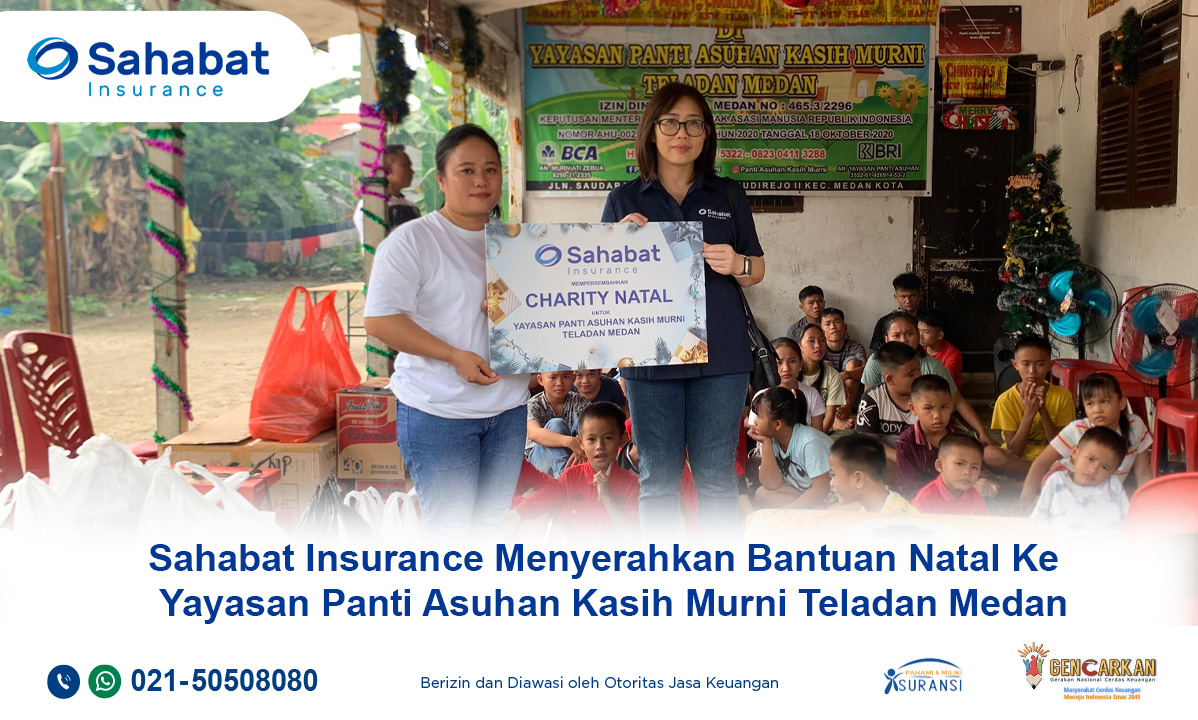
Medan, December 20 2024 – In the spirit of togetherness and compassion, PT Asuransi Sahabat Artha Proteksi (Sahabat Insurance) conducted a visit to Kasih Murni Teladan Medan Orphanage, located on Jalan Jl. Saudara Ujung, as part of this year’s Christmas celebration activities. This event aimed to share joy with the children of the orphanage and foster a sense of care within the community.
 
During the visit, several employees of Sahabat Insurance brought various essential supplies, such as staple goods, and cash donations. The event also included a prayer session and a warm interaction with the children at the orphanage.

Kasih Murni Teladan Medan Orphanage currently houses 34 children, cared for by dedicated guardians who live with the children. This place serves as a home for children from diverse backgrounds and regions who need support to grow and develop optimally.
 
Through this event, Sahabat Insurance hopes to continue contributing to creating happiness, especially during special moments like Christmas.

Berita Lainnya

Virtual Account - Sahabat Insurance

Virtual Account - Sahabat Insurance

In order to improve the quality of our services, we facilitate premium payments with payment services via Virtual Account (VA) which will be listed on every insurance policy of PT Asuransi Sahabat Artha Proteksi.

A Virtual Account is a digital payment method through an account that is created virtually for each customer. To make payments, customers will be referred to their own Virtual Accounts. A Virtual Account consists of a unique customer ID (you can find it in your premium note).

Following are the procedures for payment via BCA Virtual Account (VA):

m-BCA
1. Open m-BCA, select “m-Transfer”.
2. Select “BCA Virtual Account”.
3. Enter the Virtual Account number  and click “OK”.
4. Input your transfer amount and click “OK”.
5. Confirm the transaction detail and click “OK”.
6. Enter m-BCA PIN.
7. Transaction is successful.

ATM BCA
1. Insert your BCA debit card and enter your PIN.
2. Select "Other Transaction”.
3. Select "Transfer”.
4. Select "BCA Virtual Account”.
5. Input "Virtual Account Number"  select “OK”.
6. Input your transfer amount  and click “OK”.
7. Confirm the transaction detail and click “OK”.
8. Your transaction is complete.

Transfer From Other Bank 

Via Apps
1. Oper your Apps, input your code, select “Transfer”.
2. Select “Transfer - Other Bank”.
3. Select Bank BCA (014).
4. Enter your Virtual Account code on Beneficiary Account.
5. Input transfer amount, select “OK”.
6. Confirm the transaction detail, select “OK”.
7. Enter your PIN.
8. Transaction is successful.

Via ATM
1. Insert your card, input PIN, select “Transfer”.
2. Select “Transfer - Other Bank”.
3. Select Bank BCA (014).
4. Enter your Virtual Account code on Beneficiary Account.
5. Input transfer amount, select “OK”.
6. Confirm the transaction detail, select “OK”.
7. Enter your PIN.
8. Transaction is successful.

For more info please call Sahabat Insurance 021-50508080 or email us: [email protected]